ASCII Art Generator Guide
Use this ASCII art generator guide to create forum art, social media text art, image to ASCII conversions, FIGlet banners, and Unicode art.
The Text Art That Won’t Die
ASCII art has been declared “dead” since 1995. Three decades later, it powers over 40,000 active GitHub repositories, decorates every Linux terminal banner, and fills the r/asciiart subreddit with new posts every day. Joan Stark, one of the genre’s most prolific artists, called it “non-graphical graphics” — images built entirely from the 95 printable characters of the 1963 ASCII standard. No pixels. No rendering engines. Just characters on a screen.
For forum users, Discord server admins, and social media creators, ASCII art offers something no JPEG can: it works everywhere plain text works. Your Reddit comment, your GitHub README, your Twitter bio — all accept raw characters without rendering issues. This post covers how to turn text and images into ASCII art, which tools do it best, and where beginners get tripped up. If you need forum art, social media text art, or a creative text block for a profile, the goal is not just decoration; the output has to survive copy-paste, line wrapping, and platform markdown.
What You Need to Know
ASCII art converts visual information — text strings, photographs, illustrations — into arrangements of letters, numbers, and symbols. The core principle is simple: darker image areas get dense characters like @ or #, while lighter areas get sparse characters like . or a space.
The format traces back to typewriter art from 1893, when Flora Stacey produced a butterfly illustration on a mechanical typewriter. Bell Labs researcher Kenneth Knowlton created the first computer-generated ASCII images in 1966 — one of which entered the Museum of Modern Art’s collection in 1968. The medium peaked during the BBS era of the 1990s, when over 900 ANSI art packs were released annually, and found new life in the modern web through tools like boldtextgenerators.org, FIGlet, and AI-based text stylers.
Why does ASCII art persist? Three reasons:
Plain text compatibility. An ASCII art piece renders correctly in any terminal, text editor, or plain-text social media field. No images to load, no alt text to write, no broken embeds.
Viral potential. Text art travels through copy-paste — the frictionless distribution mechanism of forums, Discord chats, and comment sections. Our ASCII art generator outputs copy-ready text blocks optimized for Reddit and Discord markdown, so users paste once and it renders cleanly.
Creative constraint. Working with 95 characters forces deliberate artistic choices. The limitation itself becomes the creative framework — a constraint that produces distinctive results JPEG filters can’t replicate. The BoldText Generators suite extends this idea with Unicode stylizers, bubble text, and zalgo generators — same copy-paste principle, different visual languages.
ASCII Art Styles
Not all ASCII art looks the same. Understanding the major style categories helps you choose the right tool for your project.
Text Banners (FIGlet)
FIGlet-based banners convert plain words into large block-letter art using character substitution algorithms. Popular since the 1980s, FIGlet now ships with over 500 fonts — from 3D block styles to slanted cursive effects. These banners dominate GitHub README headers, terminal welcome screens, and code comment dividers.
Best for: README titles, terminal splash screens, server MOTD messages, email signatures.
Image-to-ASCII Conversion
Converting photographs and illustrations into character art is the most technically demanding approach. The process maps image brightness to character density — dark pixels become @ or #, midtones become * or +, highlights become . or spaces. Modern tools can produce full-color output where each character retains the source pixel’s hue, creating near-photographic results in text form.
Best for: Profile avatars, forum signatures, art projects, printable posters.
Unicode and Emoji Art
Beyond pure 7-bit ASCII, modern text art incorporates Unicode symbols (arrows, boxes, mathematical glyphs) and emoji to create richer compositions. This style is particularly popular on Reddit, Discord, and Twitter, where extended character sets render reliably.
Best for: Social media bios, Discord rich embeds, creative comment formatting.
Block and Shade Art
This style uses full-block characters (█, ▌, ▐, ░, ▒, ▓) to create pixel-art-like images with smooth gradients. Originally popularized by ANSI art on BBS systems, block art achieves higher visual density than traditional ASCII — trading character variety for near-pixel-level control.
Best for: ANSI-style terminal decorations, retro game tributes, high-density text graphics.
Tool Comparison: Manual vs Converter vs AI Generator
Each approach to creating ASCII art involves different tradeoffs among control, speed, and output quality. Use this comparison to decide where to start.
| Factor | Manual Drawing | Converter Tools | AI Generator |
|---|---|---|---|
| Learning curve | Steep — requires understanding character density and spatial arrangement | Minimal — upload image or enter text, adjust sliders | Zero — describe what you want in natural language |
| Output quality | Highest for original art — full creative control | High for photos — 80-character width standard delivers good detail | High for text banners — variable for complex images |
| Speed | Hours for a complex piece | Seconds to minutes | Seconds for text; minutes for detailed outputs |
| Customization | Complete — every character is deliberate | Parameter-based — width, contrast, character set, brightness | Prompt-based — iterate through conversation |
| Export formats | Plain text (.txt) | Text, PNG, JPG, HTML, SVG (varies by tool) | Text, PNG (varies by platform) |
| Color support | ANSI escape codes or terminal-specific | Full color output on supported tools (e.g., ascii-art-generator) | Depends on platform — some AI tools output colored HTML |
| Best for | Original artwork, terminal animations, community contributions | Profile pictures, forum signatures, quick social media posts | Text banners, emoji art, rapid prototyping, social bios |
| Example tools | TextPaint, JavE, ASCII Draw Studio | boldtextgenerators.org, TAAG (patorjk), ascii-image-converter | ChatGPT, Claude, Lovart |
Converter tools like boldtextgenerators.org occupy the practical middle ground — fast enough for daily use, flexible enough for most creative needs, accessible without any design or coding background.
Common Mistakes
Using too wide an output. ASCII art beyond 80 characters wide breaks in terminal windows, code comments, and narrow forum layouts. For Discord and Reddit, keep output under 60 characters. For GitHub README banners, 80 is safe.
Picking low-contrast source images. The gap between mediocre and impressive ASCII art almost always comes down to source image quality. Photos with strong lighting, clear silhouettes, and high contrast produce the best results. Flat, muddy images convert into unrecognizable character noise.
Forgetting monospace fonts. ASCII art depends on every character occupying the same width. Many social media platforms, web fonts, and email clients default to proportional fonts that distort character alignment. Always preview in a monospace environment — VS Code, Terminal, or a code block.
Pasting raw ASCII into rich text editors. Word processors, rich email clients, and some forum editors auto-convert plain text to formatted text — replacing consistent character widths with proportional rendering. Always paste into a plain-text field first, then copy from there.
Ignoring character set limitations. Unicode art looks beautiful in your terminal but may render as blank squares or garbled text on platforms that strip non-ASCII characters. For maximum compatibility, stick to the 95 standard ASCII characters (codes 32–126). Your GitHub README will thank you.
Expert Tips
Start with 80 characters wide. This is the historical standard for terminal displays and guarantees compatibility across almost every platform. For mobile-friendly output, 40–50 characters prevents horizontal scrolling.
Use braille characters for high-detail portraits. Unicode braille patterns (⠁⠂⠄⡀⢀) pack 8 dots per character, effectively quadrupling the resolution of standard ASCII. Tools like ascii-images support braille mode for near-photographic text portraits.
Test on your target platform. ASCII art that looks flawless in iTerm2 may collapse into a mess on Discord mobile. Generate your art, paste it into the actual target environment, and verify rendering before sharing publicly.
Combine tools for best results. No single tool handles every use case perfectly. Use a FIGlet generator for text banners, an image converter for photo art, and manual editing to polish. The pros at r/asciiart routinely blend multiple approaches.
Preserve your source. ASCII art is text — it can get corrupted by character encoding changes, copy-paste across platforms, or auto-formatting. Save your best work as .txt files with UTF-8 encoding. For archival purposes, export a PNG screenshot alongside the raw text.
For deeper dives into text art history and technique, the ASCII Art Archive maintains a well-researched timeline from typewriter art through modern digital culture — an authoritative resource for artists and researchers alike.
FAQ
What’s the difference between ASCII art and ANSI art?
ASCII art uses only the 95 printable characters of the standard ASCII set. ANSI art, which emerged with the VT100 terminal in 1978, adds color codes, cursor movement, and extended characters — giving it richer visual range. Think of ASCII art as black-and-white text drawings and ANSI art as colored terminal graphics with gradient blocks.
Can I use an ASCII art generator for free?
Yes. Tools like TAAG (patorjk.com), boldtextgenerators.org, and DeGraeve’s img2txt are completely free with no registration required. AI-based generators like ChatGPT and Claude also produce ASCII art in their free tiers. Paid tools typically offer SVG export, higher resolution output, or commercial usage rights for printed merchandise.
Will ASCII art work on my phone?
It depends on the platform, not the device. ASCII art renders correctly wherever monospace text is supported — Discord mobile code blocks, Reddit mobile via the official app, and Notes apps. If the platform uses proportional fonts by default, the art will appear misaligned. Always wrap ASCII art in a code block (triple backticks) for cross-device compatibility.
How do I make ASCII art from a photo?
Upload your photo to an image-to-ASCII converter tool, set the output width (start with 80 characters), adjust contrast and brightness sliders, and generate. For the best results, use high-contrast photos with clear subjects against uncluttered backgrounds. The key variables to tweak: output width, character ramp (the sequence of characters from dark to light), and contrast threshold.
What’s the best font for ASCII art?
Consolas, Menlo, Courier New, and Source Code Pro are reliable monospace fonts for ASCII art. They guarantee consistent character width — the fundamental requirement. Avoid system fonts like Times New Roman or Arial, which use proportional spacing that distorts character alignment.
Can ASCII art be colorized?
Yes, but color ASCII art typically requires rendering as an HTML block or an image export, since plain text files don’t store color data. Tools like ascii-art-generator produce full-color PNG exports. Some modern generators support ANSI escape codes for color in terminal environments, though terminal color support varies by application.
What file format should I save ASCII art in?
Save raw ASCII art as .txt with UTF-8 encoding. For sharing on image-focused platforms (Instagram, Pinterest), export as .png using a screenshot tool or a generator with image export. For web embedding, HTML rendering preserves character alignment better than pasting raw text into a page.
Bringing Characters to Life
The ASCII art community is alive and well in 2026. The r/asciiart subreddit sees daily posts ranging from terminal cat portraits to elaborate ANSI animations. The ASCII Art Archive released its 2.0 redesign in late 2025. And tools like boldtextgenerators.org continue refining the balance between creative freedom and one-click simplicity.
Pick a tool that matches your patience level. If you want to spend three hours hand-placing characters for a pixel-perfect dragon, TextPaint and JavE are waiting. If you need a forum signature or Discord banner in the next 30 seconds, drop your text into a converter and copy the output. Both paths lead to the same destination: art made of the simplest building blocks in computing.
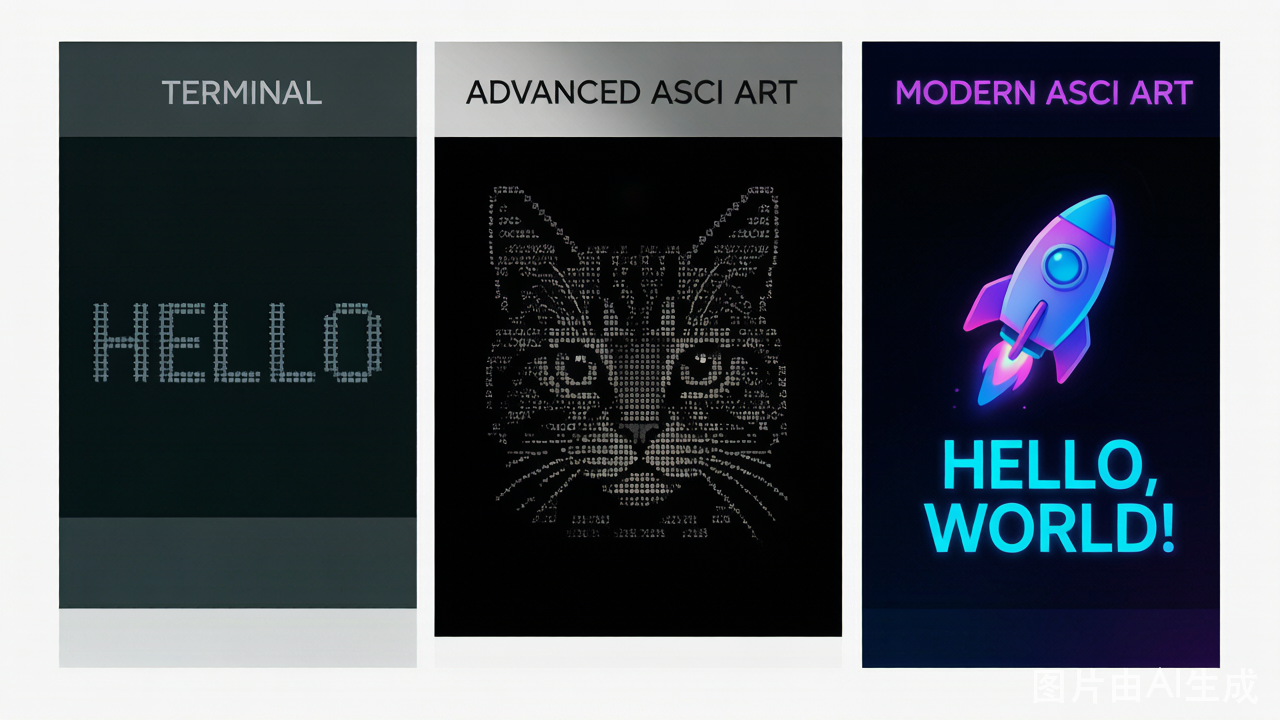
Cover image: ASCII art style comparison — text banner vs character portrait vs colorful Unicode art. Workflow diagram: the three-step ASCII generation process from input to output.
Try Bold Text Generator Now
Convert your text to bold, italic, and 5 other styles — free, no signup.
Open Generator